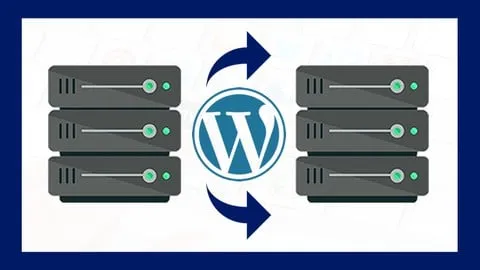
Migra un Sitio Web de WordPress a otro Dominio o Hosting
Affiliate link — we may earn a commission. Learn more
Master WordPress Site Migration with Renato Jesús Yacolca Neyra
Looking for a comprehensive and free WordPress migration course to move your website without losing data? The "Migra un Sitio Web de WordPress a otro Dominio o Hosting" Udemy course, led by expert instructor Renato Jesús Yacolca Neyra, provides a professional roadmap for transferring websites between domains or hosting providers. Updated July 2024, this training is an essential resource for anyone looking to learn WordPress migration online, offering practical skills to handle database transfers, file movements, and DNS configurations. By completing this course, students gain the technical confidence to relocate their digital presence efficiently, ensuring zero downtime and full data integrity.
What You'll Learn
- Master the complete process of migrating a WordPress website to a new domain or a different hosting provider.
- Implement the All in One WP Migration plugin to export and import entire site architectures seamlessly.
- Configure the SiteGround Migrator plugin to facilitate effortless transfers specifically to SiteGround hosting environments.
- Execute full website backups including databases, media files, plugins, and themes for secure relocation.
- Apply drag-and-drop import techniques to deploy website files onto a new server without manual FTP uploads.
- Understand the role of migration tokens in secure server-to-server transfers.
- Analyze and update DNS records to ensure the new domain points correctly to the new hosting location.
- Build a reliable migration workflow that eliminates the need for advanced programming or technical coding knowledge.
Course Details
- Instructor: Renato Jesús Yacolca Neyra
- Rating: 4.2 stars (246,153 reviews)
- Duration: On-demand video access
- Level: Beginner
- Language: Spanish (es-LA)
- Enrolled students: 246,153
- Last updated: July 2024
- Certificate: Yes, upon completion
- Includes: Lifetime access, mobile-friendly content, and professional instructional guidance
What This Course Covers
Fundamentals of WordPress Migration
- Understanding the core components of a WordPress site (Files vs. Database)
- Evaluating the risks associated with manual migration versus plugin-based migration
- Preparing the source environment for a clean export
- Determining the best migration tool based on the target hosting provider
Mastering All in One WP Migration
- Step-by-step installation and configuration of the All in One WP Migration plugin
- Creating a comprehensive export file containing posts, pages, and media
- Utilizing the "drag and drop" functionality for rapid site deployment
- Managing large file imports and overcoming common upload limit restrictions
- Verifying data integrity after the import process is complete
SiteGround Migrator Implementation
- Generating a secure migration token within the SiteGround Site Tools dashboard
- Installing the specialized SiteGround Migrator plugin on the source website
- Establishing a secure connection between the old host and SiteGround servers
- Monitoring the migration progress in real-time to ensure no data loss
- Finalizing the transfer process via the SiteGround ecosystem
Post-Migration Configuration and DNS
- Checking the website's functionality on the new server before going live
- Understanding the process of updating DNS records for domain propagation
- Handling potential URL mismatches after changing a domain name
- Testing permalinks and internal links to prevent 404 errors
- Confirming that SSL certificates are properly active on the new hosting
Technical Troubleshooting and Best Practices
- Identifying common migration errors and how to resolve them quickly
- Strategies for migrating very large websites with extensive media libraries
- Ensuring plugin and theme compatibility across different hosting environments
- Best practices for creating "staging" sites before performing a live migration
Who Should Take This Course
- Entrepreneurs and Small Business Owners who manage their own WordPress sites and need to change hosting providers to improve performance.
- Beginner Freelancers looking to offer website migration as a professional service to their clients.
- Website Administrators who are transitioning their sites to a new domain name for rebranding purposes.
- SiteGround Users who want a streamlined, official method to move their existing WordPress installations to the SiteGround platform.
- Non-Technical Users who feel intimidated by databases and FTP but want to move their site safely using no-code tools.
Prerequisites
- No prior experience in programming or server administration is needed — this course is beginner-friendly.
- A basic understanding of how the WordPress dashboard works is recommended.
- An active WordPress installation that requires migration.
- Access to the hosting control panel (CPanel or similar) of the target destination.
Why Enroll in This Course
This course provides an immense value proposition by simplifying a high-risk technical task into a series of manageable steps. For a limited time, students can access this training via a free coupon, allowing them to obtain a 100% off discount and learn from an instructor with a proven track record of teaching over 180,000 students on YouTube. Because migration is a time-sensitive task, having a structured guide prevents costly mistakes that could lead to website crashes or data loss. This course stands out because it teaches two distinct methods—one universal and one provider-specific—giving students the flexibility to handle any migration scenario.
Course Highlights
- Lifetime Access: Enroll once and have permanent access to all migration tutorials and updates.
- No-Code Approach: Focuses on powerful plugins, making it accessible to those without coding skills.
- Proven Pedagogy: Taught by Renato Jesús Yacolca Neyra, a recognized expert in SEO and digital marketing.
- Certification: Receive a certificate of completion to validate your technical skills in website management.
- Flexible Learning: Self-paced on-demand video format that fits into any professional schedule.
- Massive Community: Join over 246,000 students who have successfully navigated their WordPress migrations.
Frequently Asked Questions
Q: Is this course really free? A: Yes, the course is available for free when you use a valid limited-time coupon code. This allows you to access the full curriculum and certification without any upfront cost, provided the coupon is still active.
Q: What will I learn in this WordPress migration course? A: You will learn how to move a complete WordPress website, including its database, images, and plugins, to a new host or domain. The course specifically teaches you how to use All in One WP Migration and SiteGround Migrator to ensure the process is fast and error-free.
Q: Do I get a certificate after completing this course? A: Yes, upon successfully completing all the video lessons and requirements, Udemy provides a certificate of completion. This can be added to your LinkedIn profile or portfolio to prove your ability to handle website migrations.
Q: Is this course suitable for beginners with no technical background? A: Absolutely, the course is designed specifically for entrepreneurs and beginners. It avoids complex coding and instead focuses on user-friendly plugins and a "drag-and-drop" methodology that anyone can follow.
Q: How long do I have to enroll for free? A: Free coupons for Udemy courses are typically available for a very limited time or for a specific number of redemptions. It is recommended to enroll immediately upon finding a valid coupon to secure your lifetime access.
Final Thoughts
If you are looking to move your website without the stress of manual database exports, "Migra un Sitio Web de WordPress a otro Dominio o Hosting" is the perfect solution. This course equips you with the exact tools and workflows needed to master WordPress migration, whether you are moving to SiteGround or any other hosting provider. Start your learning journey today and ensure your website transition is seamless, secure, and professional.
Affiliate link — we may earn a commission
Affiliate link — we may earn a commission. Learn more