Exploring ArcGIS Pro: GIS Tutorials from Basics to Advanced
Affiliate link — we may earn a commission. Learn more
Exploring ArcGIS Pro: GIS Tutorials from Basics to Advanced Course Review
Looking for a comprehensive and free ArcGIS Pro course to jumpstart your career in geospatial analysis? The "Exploring ArcGIS Pro: GIS Tutorials from Basics to Advanced" udemy course, delivered by CADCIM Technologies, provides a deep dive into the industry-standard software for mapping and spatial data management. Updated for 2024, this training is ideal for anyone wanting to learn ArcGIS Pro online, offering a structured path from basic interface navigation to complex land cover analysis and terrain mapping. By completing this course, students gain the practical skills required to handle real-world spatial datasets and earn a professional certification.
What You'll Learn
- Master the complete ArcGIS Pro interface, including the Home screen and project organization tools, to streamline your geospatial workflow.
- Implement accurate georeferencing techniques for raster images using control points to ensure precise spatial alignment with real-world coordinates.
- Utilize advanced spatial data manipulation tools such as Export, Merge, Mosaic, Clip, and Extract by Mask to refine complex datasets.
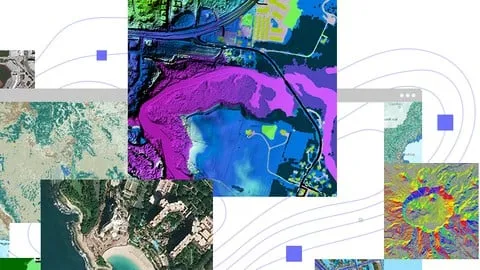
- Create professional-grade terrain visualizations, including high-resolution slope maps, contour maps, and hillshade maps for environmental analysis.
- Analyze land cover using specialized spectral indices such as NDVI (Normalized Difference Vegetation Index), NDBI, and MNDWI through mathematical formulations.
- Apply shapefile management techniques using Dissolve, Union, and Intersect tools to integrate and simplify multiple spatial data layers.
- Develop 2D and 3D elevation models to better understand topographical variations and terrain characteristics.
- Execute data export processes to convert shapefiles and raster data into various formats for cross-platform compatibility.
Course Details
- Instructor: CADCIM Technologies
- Rating: 4.0 stars (based on extensive student feedback)
- Enrollments: 537,892 students
- Level: Beginner to Advanced
- Language: English (en-US)
- Certificate: Yes, upon completion
- Includes: Lifetime access, mobile-friendly content, and on-demand video lectures
What This Course Covers
ArcGIS Pro Fundamentals and Interface
- Navigating the ArcGIS Home Screen and initial setup
- Step-by-step guide to creating new GIS projects
- Organizing and managing geospatial data within the project environment
- Customizing the interface for efficient workflow management
Georeferencing and Raster Data
- Understanding the principles of spatial referencing and coordinates
- Using control points to align raster images with real-world geography
- Validating spatial accuracy after the georeferencing process
- Handling different raster formats and their applications in GIS
Geospatial Analysis and Data Manipulation
- Utilizing the Export Tool for shapefile conversion and data sharing
- Implementing the Merge and Mosaic tools to combine spatial datasets
- Using the Clip and Extract by Mask tools to isolate specific areas of interest
- Applying real-world scenarios to test data manipulation proficiency
Advanced Shapefile Management
- Implementing the Dissolve tool to simplify spatial boundaries
- Using the Union tool to combine features from multiple layers
- Executing the Intersect tool to find overlapping spatial areas
- Strategies for integrating disparate geospatial files into a unified project
Terrain and Elevation Analysis
- Working with elevation data in 2D environments
- Creating detailed contour maps to visualize altitude changes
- Generating hillshade maps to emphasize terrain relief and texture
- Developing slope maps to analyze the steepness of the landscape
- Transitioning from 2D maps to 3D geospatial environments
Land Cover and Spectral Indices
- Understanding the mathematical formulations for vegetation and water indices
- Calculating NDVI to assess forest and crop health
- Applying NDBI for urban built-up area identification
- Using MNDWI to accurately map water bodies and moisture levels
- Integrating index calculations into final land cover analysis reports
Who Should Take This Course
- GIS Professionals who need to upgrade their skill set or transition from older GIS platforms to the modern ArcGIS Pro environment.
- University Students and Researchers specializing in geography, environmental science, or urban planning who require spatial analysis tools for their thesis or projects.
- Industry Specialists working in agriculture, forestry, and conservation where precise land mapping and vegetation analysis are critical.
- Urban Developers and Civil Engineers who need to create site maps, analyze slopes, and manage land-use data.
- Beginners and Hobbyists who are interested in learning how to work with spatial data and create professional maps from scratch.
Prerequisites
- No prior experience with GIS software is needed — this course is designed to be beginner-friendly.
- A basic understanding of computer file management and navigation is recommended.
- Access to ArcGIS Pro software is required to follow along with the practical exercises and tutorials.
Why Enroll in This Course
This course offers an exceptional value proposition for anyone looking to master geospatial technology without a heavy financial investment. By utilizing a free coupon, students can access the entire curriculum 100% off for a limited time, making high-end technical training accessible to everyone. Unlike fragmented tutorials, this course provides a linear learning path from the absolute basics to advanced land cover analysis. The ability to learn a professional tool like ArcGIS Pro through a structured, self-paced program allows students to build a portfolio of maps and analyses that are directly applicable to the job market.
Course Highlights
- Comprehensive Learning Path: Covers the entire spectrum from basic installation and interface navigation to advanced spectral indexing.
- Practical Evaluation: Includes tests and practical assessments to ensure students can apply the tools in real-world scenarios.
- Diverse Toolset: Teaches a wide array of tools including Merge, Mosaic, Union, and Intersect, providing a complete toolkit for spatial analysis.
- Industry-Relevant Skills: Focuses on high-demand skills like NDVI calculation and 3D terrain analysis used in environmental and urban planning.
- Flexible Learning: Offers lifetime access and mobile-friendly content, allowing students to learn at their own pace on any device.
- Professional Certification: Provides a certificate of completion that can be added to LinkedIn or a resume to prove GIS proficiency.
Frequently Asked Questions
Q: Is this course really free? A: Yes, this course is available for free when a valid 100% off coupon is applied. These coupons are typically offered for a limited time to help students and professionals gain access to essential GIS training.
Q: What will I learn in this ArcGIS Pro course? A: You will learn how to navigate the ArcGIS Pro interface, georeference images, manage shapefiles using advanced tools like Union and Intersect, and perform complex terrain and land cover analysis using indices like NDVI. The course moves from fundamental project creation to advanced 3D mapping.
Q: Do I get a certificate after completing this course? A: Yes, upon successful completion of all the modules and requirements, you will receive a certificate of completion from Udemy. This serves as a record of your proficiency in ArcGIS Pro and geospatial analysis.
Q: Is this course suitable for beginners? A: Absolutely. The course is specifically designed to accommodate beginners by starting with the home screen and basic project setup. It gradually increases in complexity, ensuring that those with no prior GIS experience can keep up before moving into advanced topics.
Q: How long do I have to enroll for free? A: Free coupons for Udemy courses are usually time-sensitive and may expire within a few days or once a certain number of redemptions are reached. It is recommended to enroll as soon as you find an active coupon to secure lifetime access to the materials.
Final Thoughts
"Exploring ArcGIS Pro: GIS Tutorials from Basics to Advanced" is an essential resource for anyone looking to enter the field of geospatial science or enhance their existing mapping skills. By combining fundamental interface training with advanced analysis techniques, this course ensures that learners are well-equipped for professional roles in urban planning, environmental science, and beyond. Whether you are a student or a seasoned professional, enrolling in this ArcGIS Pro training is a significant step toward mastering the art of spatial data visualization.
Affiliate link — we may earn a commission
Affiliate link — we may earn a commission. Learn more