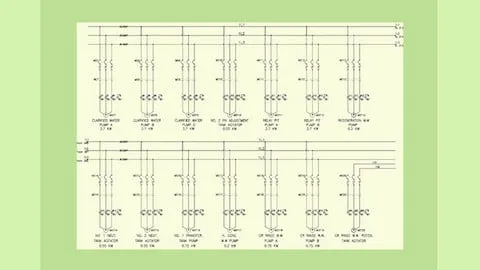
Complete Course in AutoCAD Electrical 2022
Affiliate link — we may earn a commission. Learn more
Master Industrial Design with the Complete Course in AutoCAD Electrical 2022
Looking for a high-quality, free AutoCAD Electrical course to upgrade your technical design skills? The Complete Course in AutoCAD Electrical 2022, developed by the industry experts at CADCIM Technologies, is a comprehensive Udemy course designed to help you master the intricacies of industrial electrical design. Updated for 2024, this program provides the essential training needed to learn AutoCAD Electrical online, enabling you to create professional-grade control drawings, automate complex engineering tasks, and earn a recognized certification. Whether you are a student or a working professional, this course delivers the practical skills required to excel in modern electrical drafting.
What You'll Learn
- Build professional electrical control drawings from the ground up using the specialized toolsets available in AutoCAD Electrical.
- Master the creation of complex schematic drawings to ensure precise electrical system layouts and reduced drafting errors.
- Implement the Circuit Builder tool to automate the process of creating standard electrical circuits, significantly increasing your productivity.
- Create detailed panel drawings that accurately represent physical hardware installations and component placements.
- Analyze and deploy both parametric and non-parametric PLC modules to design sophisticated industrial automation systems.
- Apply automatic report generation to produce accurate bills of materials, wire lists, and PLC I/O reports without manual data entry.
- Understand the nuances of point-to-point wiring diagrams to facilitate seamless system implementation and on-site installation.
- Develop custom electrical symbols to meet specific project requirements and adhere to international industry standards.
Course Details
- Instructor: CADCIM Technologies
- Rating: 4.2 stars
- Duration: 140 comprehensive video lectures
- Level: Beginner to Professional
- Language: English (en-US)
- Enrolled students: 537,086
- Last updated: October 2023
- Certificate: Yes, upon completion
- Includes: Lifetime access, mobile-friendly content, and practice tests
What This Course Covers
Fundamentals of AutoCAD Electrical
- Introduction to the AutoCAD Electrical user interface and workspace customization
- Navigating the specialized toolsets and ribbons for electrical design
- Setting up a new project environment and managing project-wide properties
- Understanding the difference between standard AutoCAD and the Electrical toolset
- Basic drawing setup and configuring drawing properties for professional output
Schematic Design and Circuitry
- Creating detailed electrical schematic drawings from a blank canvas
- Utilizing the Circuit Builder to rapidly deploy common electrical circuits
- Drafting professional ladder diagrams for complex control logic
- Automating the process of numbering wires and tagging components for consistency
- Managing cross-referencing for components spread across multiple drawing sheets
- Using the schematic audit tool to find and fix design errors automatically
PLC and I/O Integration
- Implementing parametric PLC modules for standard industrial controllers
- Designing non-parametric PLC layouts for custom hardware configurations
- Managing stand-alone PLC I/O points for flexible design requirements
- Integrating spreadsheet data directly into PLC I/O drawings to save time
- Mapping PLC addresses and ensuring data integrity across the project
- Creating I/O lists and automating the connection between PLCs and field devices
Panel Layouts and Physical Design
- Developing professional panel drawings based on schematic data
- Mapping schematic components to physical panel locations for accurate layout
- Creating point-to-point wiring diagrams to guide the physical assembly process
- Organizing footprints and hardware placement to optimize panel space
- Utilizing the panel layout toolset to ensure correct component scaling
- Integrating DIN rail and wire duct layouts into the physical design
Documentation and Symbol Creation
- Generating automatic reports including Bills of Materials (BOM) and wire lists
- Creating custom electrical symbols to meet specific project or company standards
- Exporting project data for procurement, manufacturing, and installation
- Finalizing comprehensive drawing sets for professional submission and archiving
- Using the Symbol Builder to create a library of reusable project components
- Organizing and managing the symbol library for team collaboration
Who Should Take This Course
- Engineering Students: Specifically those pursuing a degree or diploma in electrical engineering who want to bridge the gap between theory and professional software application.
- Practicing Electrical Designers: Professionals looking to modernize their workflow by moving from manual drafting or basic CAD to automated electrical design.
- Control Systems Engineers: Designers aiming to improve the accuracy and speed of their control drawings and PLC layouts.
- CAD Beginners: Individuals with a basic interest in CAD who want a specialized, career-focused path in the electrical sector.
- Technical Professionals: Anyone in the industrial field who needs to read, modify, or create professional electrical schematics for power plant or factory layouts.
Prerequisites
- No prior experience with AutoCAD Electrical is needed — this course is beginner-friendly and starts from the basics.
- A foundational understanding of basic electrical engineering principles is recommended to better understand the circuit logic.
- Access to AutoCAD Electrical 2022 software (or a compatible version) is highly recommended to follow the hands-on exercises.
- A computer capable of running the AutoCAD suite efficiently.
Why Enroll in This Course
This course offers an unparalleled deep dive into industrial electrical design, making it a top choice for anyone wanting to master the software. By utilizing the available free coupon, you can enroll in this high-value program at 100% off, providing professional-grade training without the financial burden. Because these offers are typically limited-time opportunities, enrolling today ensures you secure lifetime access to these valuable resources before the coupon expires. This course stands out from other tutorials because of its pedagogical structure, featuring 140 organized video lectures that move logically from basic drafting to complex automation and report generation.
Course Highlights
- Comprehensive Curriculum: With over 140 video lectures, this course leaves no stone unturned, covering everything from basic setup to advanced PLC modules.
- Hands-on Practicality: The inclusion of practice examples and a final practice test ensures that you can apply what you learn to real-world scenarios.
- Professional Certification: Upon completion, you receive a certificate that validates your proficiency in AutoCAD Electrical, providing a tangible asset for your resume.
- Focus on Automation: Unlike general CAD courses, this training emphasizes automation tools like automatic wire numbering and BOM generation, which are critical for industry efficiency.
- Self-Paced Learning: The lifetime access model allows you to learn at your own speed, revisiting complex modules like PLC integration as often as needed.
- Industry-Standard Approach: The course is designed to mirror actual industry workflows, preparing you for the demands of professional electrical design firms.
Frequently Asked Questions
Q: Is this course really free? A: Yes, by using the provided free coupon, you can enroll in this Complete Course in AutoCAD Electrical 2022 at 100% off. This allows you to access all 140 lectures and the final certificate without any payment.
Q: What will I learn in this AutoCAD Electrical course? A: You will learn how to create professional electrical control drawings, schematic diagrams, and physical panel layouts. The curriculum covers specialized tools like the Circuit Builder, PLC I/O drawing integration, and automatic report generation for bills of materials.
Q: Do I get a certificate after completing this course? A: Yes, upon successful completion of the course modules and the requirements set by the instructor, you will receive a certificate of completion from CADCIM Technologies via the Udemy platform.
Q: Is this course suitable for beginners? A: Absolutely. The course is specifically designed to accommodate both engineering students and practicing professionals. It begins with the fundamental interface of the software before progressing into advanced automation and design techniques.
Q: How long do I have to enroll for free? A: Free coupons for Udemy courses are usually limited by either a specific expiration date or a maximum number of redemptions. It is highly recommended that you enroll as soon as possible to ensure you secure your spot before the offer ends.
Final Thoughts
The Complete Course in AutoCAD Electrical 2022 is an essential resource for any aspiring or current electrical engineer looking to dominate the field of industrial design. By combining theoretical knowledge with rigorous practical exercises, it empowers you to master AutoCAD Electrical and produce industry-standard documentation with ease. Whether you are looking to enter the workforce or upgrade your existing skills, this is the perfect starting point. Start your learning journey today and elevate your professional design capabilities to the next level!
Affiliate link — we may earn a commission
Affiliate link — we may earn a commission. Learn more