Cómo Migrar un Sitio Web de WordPress a Cloudways 2026
Affiliate link — we may earn a commission. Learn more
Cómo Migrar un Sitio Web de WordPress a Cloudways 2026 Review
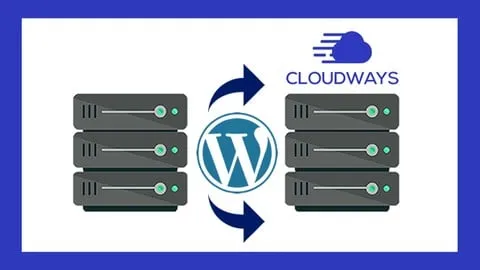
Looking for a free WordPress migration course to optimize your site's performance and scalability? The Cómo Migrar un Sitio Web de WordPress a Cloudways 2026 udemy course, taught by the experienced instructor Renato Jesús Yacolca Neyra, provides a comprehensive, step-by-step guide to moving your website to a high-performance cloud environment. Updated July 2026, this training ensures you learn how to migrate your site online efficiently, focusing on minimizing downtime and maximizing server speed using professional cloud tools. This course is specifically designed to help you achieve a seamless transition to managed cloud hosting, ensuring your website remains secure and fast.
What You'll Learn
- Create a free Cloudways account to begin exploring managed cloud hosting without initial costs.
- Configure a high-performance cloud server and install WordPress from scratch within the Cloudways ecosystem.
- Master the use of the Cloudways WordPress Migrator plugin to automate the transfer of files and databases.
- Implement a full website migration from any existing hosting provider to the Cloudways platform.
- Apply DNS configurations to point your custom domain to your new Cloudways server accurately.
- Install a professional SSL certificate to ensure all website traffic is encrypted and secure.
- Analyze the migration process to identify and prevent common errors that cause site downtime.
- Understand the benefits of managed cloud hosting for improving SEO and user experience.
Course Details
- Instructor: Renato Jesús Yacolca Neyra
- Rating: 4.6 stars
- Level: Beginner
- Language: Spanish (es-LA)
- Enrolled students: 246,232
- Last updated: July 2026
- Certificate: Yes, upon completion
- Includes: Lifetime access, mobile-friendly content
What This Course Covers
Cloud Infrastructure Setup
- Step-by-step guide to creating a free Cloudways account for new users
- Navigating the Cloudways dashboard to manage server resources
- Selecting the appropriate server size and location for your target audience
- Understanding the basics of managed cloud hosting versus shared hosting
WordPress Deployment on Cloudways
- Launching a fresh WordPress application instance on the cloud server
- Configuring initial application settings for optimal speed and performance
- Managing server-level settings to enhance website stability
- Understanding the relationship between the cloud server and the WordPress installation
The Automated Migration Process
- Detailed walkthrough on installing the Cloudways WordPress Migrator plugin on the source site
- Configuring the connection between the existing host and the new Cloudways server
- Inputting server credentials and initiating the automated migration sequence
- Managing the transfer of all website files, media libraries, and SQL databases
Domain and DNS Configuration
- Understanding the process of pointing a domain name to a cloud server IP
- Modifying DNS records at the registrar level for a seamless transition
- Verifying domain propagation to ensure the site is accessible globally
- Troubleshooting common domain mapping issues during the migration phase
Security and SSL Implementation
- Implementing a free Let's Encrypt SSL certificate for site encryption
- Configuring forced HTTPS redirects to improve security rankings
- Understanding the impact of SSL certificates on search engine optimization (SEO)
- Verifying the security padlock in browsers to build user trust
Who Should Take This Course
- Entrepreneurs and Business Owners who want to migrate their WordPress site to a more reliable and faster hosting provider.
- Beginner Web Developers looking to master the technical process of cloud migration using professional tools.
- WordPress Users who are currently experiencing slow load times on shared hosting and wish to move to the cloud.
- Digital Marketers aiming to improve their clients' website performance to increase conversion rates and SEO.
- Freelancers who want to offer website migration services as a professional value-add to their clients.
Prerequisites
- No prior experience needed — this course is beginner-friendly and starts from the basics.
- Having an existing WordPress website hosted on any platform is recommended for practical application.
- Access to your domain registrar account (e.g., Namecheap, GoDaddy) to update DNS settings.
Why Enroll in This Course
This course offers an exceptional value proposition for anyone looking to professionalize their web hosting infrastructure. By utilizing a limited-time free coupon, you can obtain 100% off the enrollment fee, allowing you to learn from a proven expert with a massive student following. The instruction is provided by Renato Yacolca, a recognized authority in digital marketing and programming with a track record of teaching hundreds of thousands of students. Given that website migrations can be risky, having a structured, updated 2026 guide is essential to prevent data loss and avoid extended downtime for your business.
Course Highlights
- Lifetime Access: Once enrolled, you have permanent access to all video lessons and updates.
- Self-Paced Learning: The format allows you to move through the migration steps at your own speed.
- Certification: Earn a certificate of completion to validate your skills in cloud migration.
- Mobile-Friendly: Access the tutorial on any device, making it easy to follow along while working on your computer.
- Expert Instruction: Learn from a consultant who specializes in SEO and digital marketing.
- Practical Approach: The course focuses on the actual tools used in the industry, specifically the Cloudways Migrator plugin.
Frequently Asked Questions
Q: Is this course really free? A: Yes, this course is available for free when you use a valid free coupon. These coupons are typically offered for a limited time to allow students to experience the quality of the training before investing in further advanced courses.
Q: What will I learn in this WordPress migration course? A: You will learn the entire end-to-end process of moving a website, starting from creating a Cloudways account and setting up a server. The course covers the actual migration using a specialized plugin, pointing your domain to the new server, and securing the site with an SSL certificate.
Q: Do I get a certificate after completing this course? A: Yes, upon successful completion of all the lessons, you will receive a certificate of completion from Udemy. This certificate can be added to your LinkedIn profile or portfolio to demonstrate your technical proficiency in WordPress and cloud hosting.
Q: Is this course suitable for beginners? A: Absolutely, the course is specifically designed for entrepreneurs and beginners who may not have a deep technical background. The instructor breaks down complex concepts like DNS and SSL into simple, easy-to-follow steps.
Q: How long do I have to enroll for free? A: Free coupons are usually time-sensitive and available for a limited number of redemptions. It is highly recommended to enroll as soon as possible to ensure you secure your spot before the 100% off promotion expires.
Final Thoughts
The Cómo Migrar un Sitio Web de WordPress a Cloudways 2026 course is an essential resource for anyone looking to upgrade their hosting environment for better speed and reliability. By following the expert guidance of Renato Jesús Yacolca Neyra, you can move your site to the cloud with confidence and zero stress. Whether you are an entrepreneur or a budding developer, this training provides the practical skills needed to master WordPress migration online. Start your journey toward a faster, more professional website today!
Affiliate link — we may earn a commission
Affiliate link — we may earn a commission. Learn more