
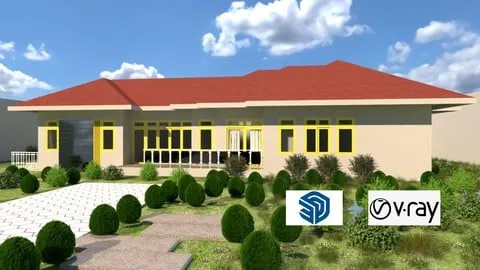
SketchUp VRay Layout From Beginner to Advanced Course
Affiliate link — we may earn a commission. Learn more
SketchUp Vray Layout From Beginner to Advanced Course – taught by Thinzar Nyo Lai – is a comprehensive Udemy training that lets you master SketchUp modeling, V‑Ray rendering, and professional layout creation. Updated July 2026, this free‑coupon‑eligible course covers everything from installing SketchUp 2021 to producing photorealistic interior and exterior renders. Whether you’re an aspiring interior designer, architect, or visualizer, the curriculum delivers practical skills, real‑world projects, and a Udemy certificate that boosts your portfolio.
What You'll Learn
- Build complete 3‑storey house models using SketchUp’s core tools and advanced plugins.
- Master SketchUp’s component and group system to create reusable furniture libraries.
- Learn to install and configure V‑Ray 5, including HDRI, dome lights, and Chaos Cosmos for realistic lighting.
- Understand material workflows: Pain Bucket, VRay material editor, texture mapping, and white‑balance adjustments.
- Create interior lighting setups with emissive, IES, rectangle, sphere, and spot lights for accurate illumination.
- Implement VRay render settings, denoiser usage, and exposure control to produce clean, high‑quality images.
- Apply Layout and print techniques, including title block creation and PDF export for client presentations.
- Analyze plugin integrations such as MAJ Rail, Shape Bender, 1001Bit Tool, and Instant Pro Roof to accelerate modeling speed.
Course Details
- Instructor: Thinzar Nyo Lai
- Rating: 4.2 stars (3,225 reviews)
- Level: Beginner → Advanced
- Language: Myanmar (my‑MM)
- Enrolled students: 3,225
- Certificate: Yes, upon completion
- Includes: Lifetime access, downloadable project files, mobile‑friendly video playback
What This Course Covers
Installation & Workspace Setup
- How to install SketchUp 2021 full version and activate V‑Ray 5.
- Configuring template files, units, and default workspace preferences.
- Managing plugins: MAJ Rail, Shape Bender, 1001Bit Tool, Instant Pro Roof.
- Setting up Layer and Entity Info panels for organized modeling.
Core Modeling Tools & Techniques
- Using line, rectangle, circle, and arc tools to draft precise geometry.
- Applying Push‑Pull, Offset, and Follow‑Me for rapid 3‑D shape creation.
- Mastering Group vs. Component hierarchy for efficient model editing.
- Implementing Tape Measure, Protractor, and Dimension tools for accurate scaling.
Furniture & Interior Projects
- Modeling common furniture pieces: tables, sofas, slide doors, and window assemblies.
- Importing and customizing components from 3D Warehouse.
- Creating JPEG photo‑based models for textured décor elements.
- Building interior lighting schemes and rendering realistic interiors.
Lighting & Rendering with V‑Ray
- Setting up emissive, IES, rectangle, sphere, and spot lights for diverse scenarios.
- Configuring VRay Sun, HDRI, and Dome Light for natural illumination.
- Adjusting exposure, white balance, and denoiser to eliminate noise.
- Applying VRay material library and custom texture mapping for photorealism.
Advanced Plugins, Layout & Presentation
- Using Shape Bender and MAJ Rail to generate complex roof and rail structures.
- Generating 3‑storey classic house projects with integrated plugins.
- Preparing print‑ready Layout sheets, title blocks, and PDF exports.
- Adding 3‑D grass objects via Chaos Cosmos and finalizing client‑ready presentations.
Who Should Take This Course
- Beginners with no prior SketchUp or V‑Ray experience seeking a solid foundation.
- Interior designers and architects who want to produce photorealistic renderings for client proposals.
- Furniture modelers aiming to create reusable components and export ready‑to‑manufacture designs.
- Professionals transitioning to 3‑D visualization roles in construction, real‑estate, or gaming.
- Hobbyists interested in learning advanced plugins and mastering layout documentation.
Prerequisites
- No prior experience needed — this course is beginner‑friendly.
- Basic computer literacy (ability to install software and navigate file systems) is recommended.
Why Enroll in This Course
Enroll now to take advantage of a free coupon that grants 100 % off for a limited time. The curriculum blends foundational SketchUp skills with professional V‑Ray rendering techniques, delivering a complete pipeline from concept to presentation. Compared with other Udemy options, this course offers real‑world projects, extensive plugin coverage, and a focus on both interior and exterior design workflows, making it a valuable investment for aspiring visualizers.
Course Highlights
- Lifetime access to all video lessons and downloadable resources.
- Self‑paced learning allows you to progress from basics to advanced topics on your schedule.
- Certificate of completion adds credibility to your portfolio and LinkedIn profile.
- Mobile‑friendly videos let you study on smartphones or tablets while on the go.
- Hands‑on projects such as a 3‑storey classic house and realistic interior renders.
- 30‑day money‑back guarantee ensures risk‑free enrollment if the material doesn’t meet expectations.
Frequently Asked Questions
Q: Is this course really free?
A: Yes. By applying the available free coupon, you can enroll in the SketchUp Vray Layout From Beginner to Advanced Course at 100 % off. The coupon is valid for a limited period, so act quickly to claim the free enrollment.
Q: What will I learn in this SketchUp course?
A: You will learn to install SketchUp 2021, use core modeling tools, differentiate groups and components, create furniture and architectural projects, master V‑Ray lighting and rendering, and produce professional layout and print documents. The course also covers essential plugins that streamline complex modeling tasks.
Q: Do I get a certificate after completing this course?
A: Yes. Upon finishing all modules and passing the optional quizzes, Udemy issues a certificate of completion that you can share with employers or add to your online portfolio.
Q: Is this course suitable for beginners?
A: Absolutely. The curriculum starts with software installation and basic tool usage, progressing gradually to advanced rendering and plugin integration, making it ideal for learners with no prior SketchUp or V‑Ray experience.
Q: How long do I have to enroll for free?
A:
Affiliate link — we may earn a commission
Affiliate link — we may earn a commission. Learn more



